Duplicate IP problem can create trouble time in your network; mostly you will feel it frequently dropped connection. It might be caused by wrong DHCP server configuration or more than one network device functioning as DHCP server.
Option 1
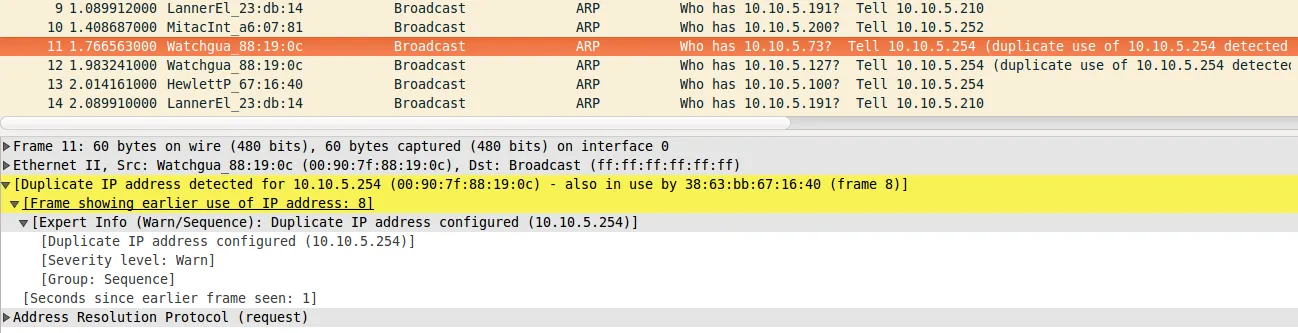
To detect if it is the case for your problem; you can simply check ARP packets with Wireshark and you will see some packets like the capture below:
Option 2
If you don’t have Wireshark installed on your device with you. You can use arp-scan command:
$ sudo arp-scan -I eth0 -l | grep -i dup
10.10.5.68 e0:ca:94:d9:ed:80 Askey Computer (DUP: 2)
10.10.5.89 bc:a9:20:e4:85:8e (Unknown) (DUP: 2)
10.10.5.94 78:31:c1:c4:54:e4 (Unknown) (DUP: 2)
10.10.5.71 5c:f8:a1:e7:80:5a (Unknown) (DUP: 2)
10.10.5.83 b0:70:2d:a4:9c:97 (Unknown) (DUP: 2)
10.10.5.143 10:a5:d0:05:9c:85 (Unknown) (DUP: 1)
10.10.5.100 80:19:34:82:34:a8 (Unknown) (DUP: 2)
10.10.5.114 40:40:a7:e1:80:02 (Unknown) (DUP: 1)
10.10.5.99 b0:72:bf:7d:e4:f0 (Unknown) (DUP: 2)
10.10.5.125 64:bc:0c:64:54:87 (Unknown) (DUP: 1)
10.10.5.146 c4:9a:02:5a:2d:db (Unknown) (DUP: 1)
10.10.5.146 c4:9a:02:5a:2d:db (Unknown) (DUP: 2)
Comments
Comments are kept in GitHub Discussions. You need a GitHub account to write one.